Free quiz and course authoring bundle
iSpring Free is a free education companion that aids you to create engaging and responsive courses as well as quizzes right within your Microsoft Powerpoint application. Without paying anything, you can effortlessly convert slides to HTML5 or SCORM which will make the educational content easily available on any device.
Top Recommended Alternative
.png)
It can even add relevant YouTube videos for a better illustration of the topic. However, the free-of-charge version of iSpring is limited in features although it's available to freely use with no time restraints. If you wish to utilize more of its extensive functions then consider purchasing iSpring Suite.
Turn PPT slides into interactive education material
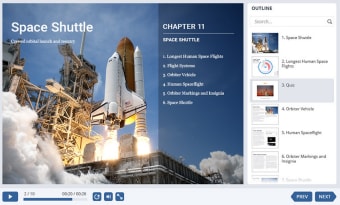
With iSpring Free, you have an instant capability to turn your simple PowerPoint slides into an interactive online course, keeping all animations, triggers, transitions, and media intact. The program integrates perfectly with Microsoft's popular slideshow tool which makes it quick and easy for you to create attractive, animated multimedia presentations. You only need to hit the 'Publish' button once PPT is finished, select some options and you're all set. The organized project is converted in a universal file format and can seamlessly be viewed on any device or browser.
As mentioned, the solution also allows you to insert web objects like YouTube videos that are related to the subject though it gives no option to set the compression rates for specific elements such as images, sound, etc. By converting PPT slides to HTML5, SCORM 1.2, or SCORM 2004, smooth online sharing can be supported as well as uploading to your own LMS. Keep in mind that when downloading the software, you need to provide your email address first.
iSpring Free vs. iSpring Suite
Obviously, the major difference between iSpring Free and iSpring Suite is the pricing. The Free version is, of course, available to be used without demanding any charge while the Suite edition requires to be purchased. However, the Free bundle naturally offers fewer tools and features as compared to Suite. For the record, it is only ideal to organize quizzes and courses here. The iSpring Suite, on the other hand, is more optimum for extensive online learning.
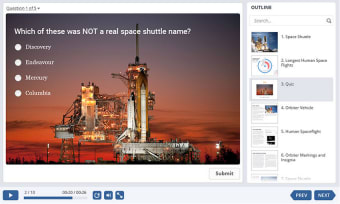
iSpring Free is already a sufficient utility if you only need three question types to assess the knowledge retention of your students and cultivate course topics. Screen recording, video and audio narration, various interactions, quizzes, and dialogue simulation options are among the Suite's inclusive special features that enrich more of the teaching content and make it more appealing to the audience. Not only that, it also supports the usage of iSpring Space—an online space for team collaboration on authoring courses.
Produce pleasing demos
iSpring Free grants you the power to easily create the classic PPT slides and convert them into interesting quizzes or course materials. These are presentable enough to be demonstrated in an educational institution. Although for better teaching demos, iSpring Suite is a much more packed software solution that you can consider buying if you need so. On the developer's website, you'll find tutorials and other relevant materials to master the utilization of the program.

















.png)